
Combat Settings & Turn Timer — Ruins of Myth Drannor
Turn timer limits, combat animation speed, initiative UI, and difficulty feel—sourced from the 2026 store and Original 2001 FAQ/walkthroughs.
FAQ
What is the fastest turn timer in the original FAQ?
Should new players use the turn timer?
Where is combat round speed in the Original game?
Does Legacy mode change combat settings?
How does combat pacing work?
Pool of Radiance: Ruins of Myth Drannor stops time in encounters: you issue moves, attacks, and spells per character, then enemies act. The Sorcerer’s Place FAQ (2001) confirms turn-based resolution with an adjustable turn timer—either unlimited thinking time or a short clock per action.
The Remaster (2026) Steam page adds optional timed turns as a pressure layer and adjustable combat animation speed so you can shorten spell fly-by cameras without changing rules (checked 2026-11-07). Those are separate knobs in marketing copy; whether they share one menu is Unverified in the remaster.
What is the turn timer?
Original (2001): FAQ text: timer can run down to about six seconds per action or be turned off for unlimited planning (Sorcerer’s Place, 2001).
Remaster (2026): Store features list turn timer / timed turns without numeric seconds (Steam, 2026-11-07). Assume parity until proven otherwise—Unverified in the remaster for minimum seconds and per-character vs per-round scope.
Beginner advice (sourced): Gaming.net’s remaster guide says disable the timer until you know the action bar (2026-11-06). AIssil’s Original combat hints likewise treat unlimited time as the learning default (2002). Enable timed play only when you want tension, not on tutorial fights—see beginner guide.
Combat round speed vs animation speed
Original (2001) walkthrough (AIssil §III Game Settings) lists combat round speed beside shadow, volume, and mouse options (2002). Community speed utilities existed because retail animations felt slow (GameBanshee news on third-party tools, 2004).
Remaster (2026): Steam advertises adjustable combat animation speed natively. Unverified in the remaster: whether this slider is the same variable as legacy combat round speed, or a new post-2001 channel.
If fights drag:
- Raise animation speed first (store promise).
- Leave timer unlimited while learning spell targeting (multiclass guide if you split caster levels).
- Compare Legacy mode on/off only if you suspect UI latency—no verified link ( Legacy mode ).
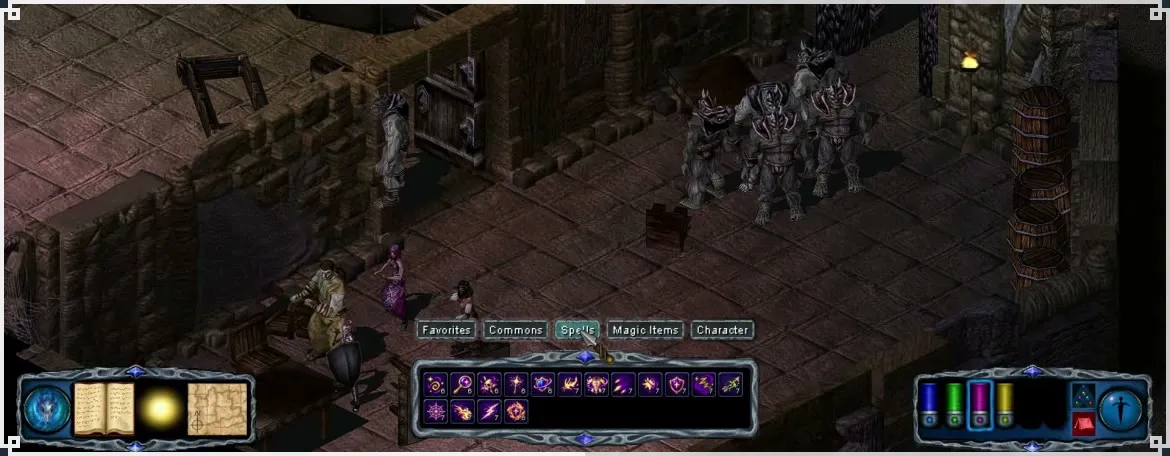
What do initiative and the action bar show?
Official Remaster (2026) screenshots (Steam) show:
- A top initiative strip highlighting the active combatant
- A bottom action bar with tabs such as Spells, favorites rows, and controller prompts
- Combat log text for attack rolls and action points
These elements appear in our wiki images—for example grassland melee UI with initiative text and an action-point message:
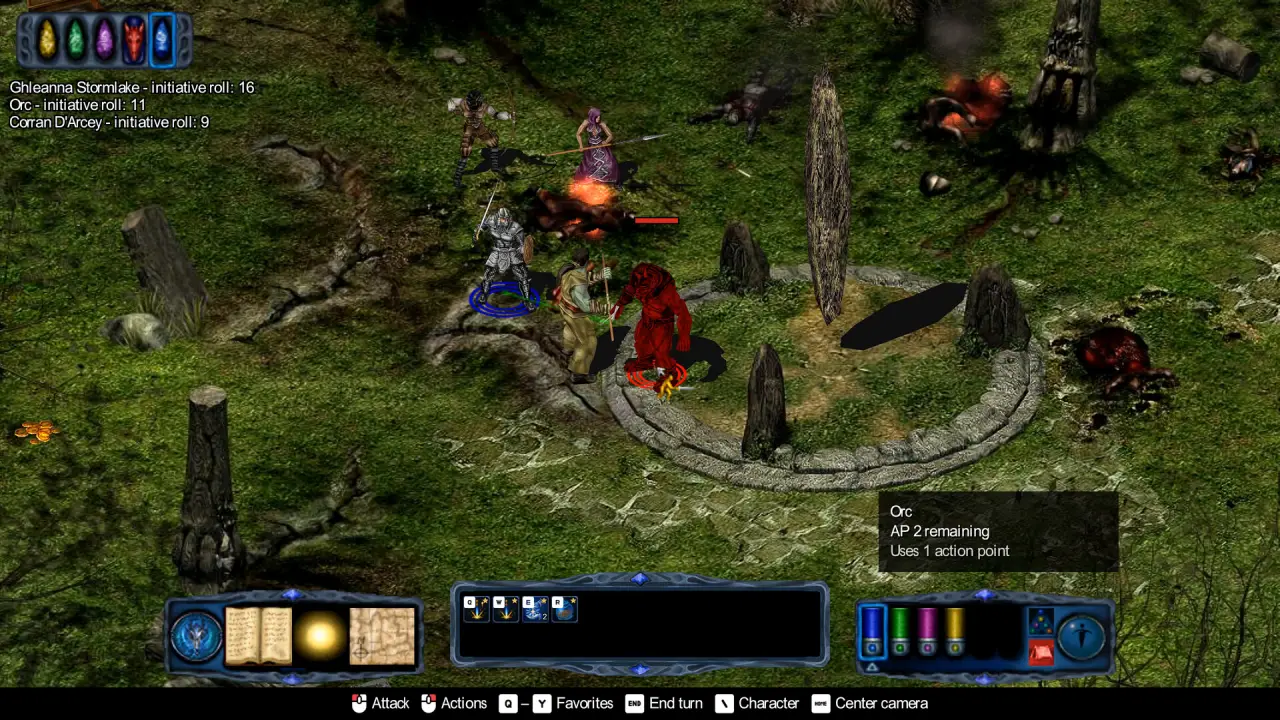
Original (2001) guides mention Flanking, Delay, Refocus, Power Attack, and post-spell move indicators (AIssil hints). We assume those rules persist because SNEG says the core is unchanged—Unverified in the remaster for each toggle’s button location on the new bar.
Targeting and AoE spells
Store extras footage shows Fireball targeting with a yellow area circle and on-screen instructions (“Select a target. Cancel.”). That flow matters for timer anxiety: slow targeting burns clock if timed turns are on.
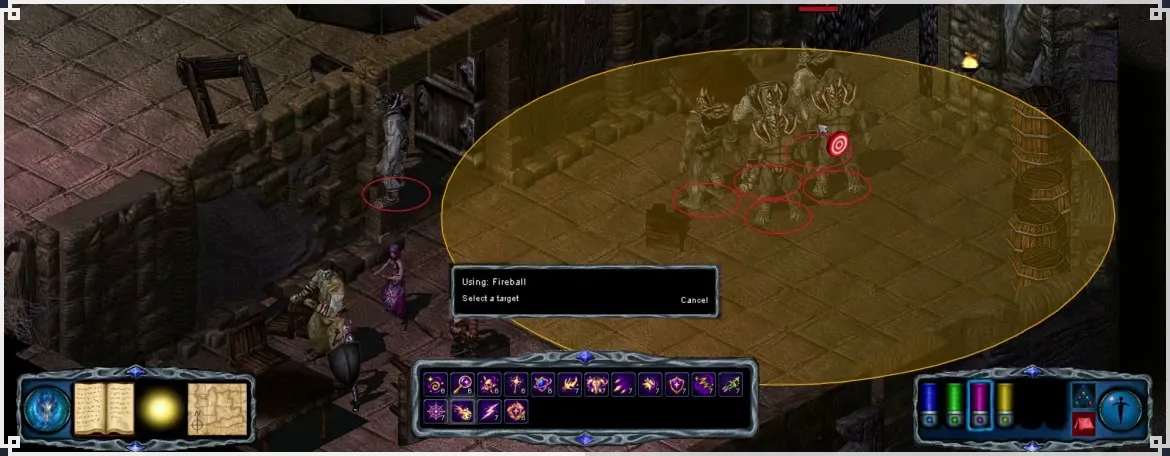
Practice on red-ringed foes in safe encounters before enabling timers (tips and tricks for doorway tactics sourced from AIssil).
Difficulty feel—not a hidden slider
Store pages do not advertise a combat difficulty dropdown. Challenge comes from:
- D&D 3E to-hit and save math
- Long dungeon crawls and undead-heavy encounters (Original reputation; AIssil; Steam/GOG review themes)
- Optional timed turns you control
- Player tactics: choke points, rest tent colors, reload when stuck (AIssil; Original meta)
Walkthrough overview covers structure; best party covers roles—not stat inflation.
Settings checklist before a hard fight
| Step | Action | Source |
|---|---|---|
| 1 | Turn timer off while learning | Gaming.net 2026; AIssil |
| 2 | Set animation speed to taste | Steam remaster bullet |
| 3 | Confirm spell tab / favorites on action bar | Steam screenshots |
| 4 | Save before pulling levers or big spell drops | AIssil meta; saves and crashes |
| 5 | Revisit timer once actions are automatic | Gaming.net |
Menu paths for steps 1–2 in the remaster: Unverified in the remaster (no official menu map at 2026-11-07).
Controller considerations
Steam lists full controller support (2026-11-07). Screenshots show Move/Actions style hints on the bottom bar during exploration and combat. Whether timer pauses while radial menus are open is Unverified in the remaster—test in the tutorial. More on Steam Deck and controller.
Sources and what we haven’t verified
Sources: Steam store 4834760 (2026-11-07); Sorcerer’s Place FAQ timer (2001); AIssil Game Settings & combat hints (2002); Gaming.net remaster tips (2026-11-06); Steam screenshot assets per media manifest.
Unverified in the remaster: Minimum timer seconds; menu location of timer and animation sliders; interaction with Legacy; whether combat round speed label survives; pause behavior with tooltips open.
Related Articles
classes
Best Class in Ruins of Myth Drannor: Role-by-Role Pick
Compare all eight classes in Ruins of Myth Drannor by party job—tank, healer, traps, and arcane output—using manual and FAQ sources.
classes
Cleric Build — Ruins of Myth Drannor
Cleric build guide for Pool of Radiance: Ruins of Myth Drannor—point buy, divine spells, Turn Undead, and party healing in the 2026 remaster.
classes
Fighter Build — Ruins of Myth Drannor
How to build a Fighter in Pool of Radiance: Ruins of Myth Drannor: stats, race picks, front-line role, and what the 2026 remaster still auto-assigns.
Was this helpful?
Thanks for the feedback!